Electrical Overview
Before understanding how this house works, it helps to understand how electricity normally works in a typical home. We’ll start simple.
How Electricity Works in a Normal House
Electricity comes from the utility company into your main electrical panel. From there, it travels through wires to outlets, switches, and lights.
For a basic light circuit, there are three important parts:
- Hot wire – brings electricity from the panel to the device.
- Neutral wire – carries electricity back to the panel.
- Ground wire – safety path (we won’t focus on it for now).
Electricity needs a complete loop to work. If the loop is complete, the light turns on. If the loop is broken, the light turns off. In a traditional house, the wall switch physically breaks the hot wire, which in turn breaks the loop. When the loop is not completed the lights are off
When you flip the switch:
- ON → it connects the hot wire → electricity flows → light turns on.
- OFF → it disconnects the hot wire → electricity stops → light turns off.
Traditional Wiring diagram
The important thing to understand: The wall switch directly controls the power going to the light. There is no computer. No brain. No network. Just a mechanical break in the hot wire Simple. Reliable. Very old-school.
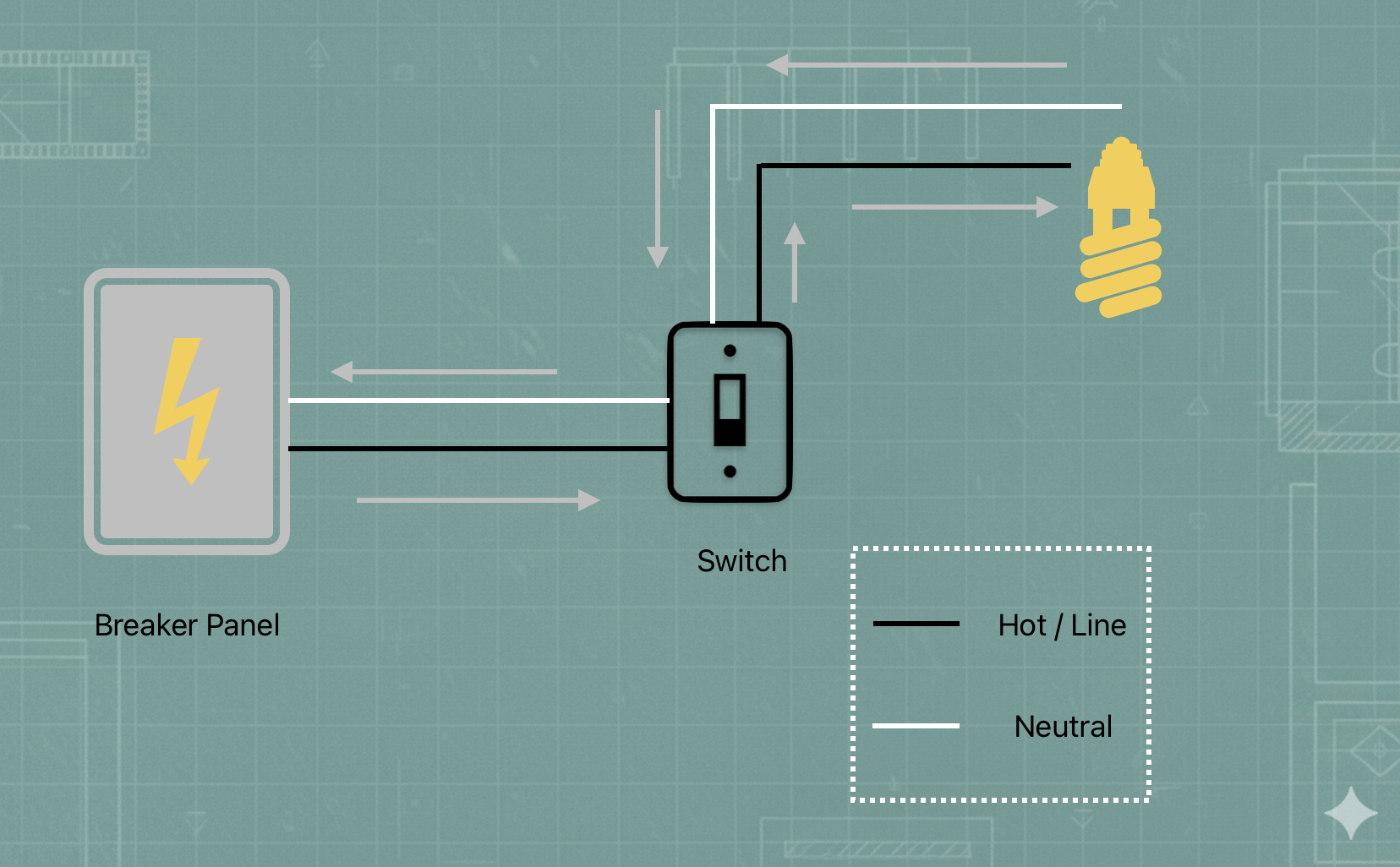
Notice only the Hot cable is disconnected to break the loop
How Electricity Works with LiteTouch
Now things get interesting. In a LiteTouch system, the wall switches did not directly control the electricity going to the light. Instead of each switch breaking the hot wire, the house was wired differently.
AC vs. DC: The Two Worlds
To understand LiteTouch, you have to understand the two types of "juice" running through the walls:
- AC (Alternating Current - 110v): This is the "heavy lifting" electricity. It powers your fridge, your microwave, and your lightbulbs. It is powerful and can be dangerous.
- DC (Direct Current - 24v): This is low voltage electricity. It’s the same kind used by your phone charger or a battery (like duracell). It’s safe to touch at just 24V.
LiteTouch Components:
The Switches (The Keypads)
In a normal house, the switches are dangerous to touch inside because they carry 110v AC (high voltage). In a LiteTouch house, the switches only carried 24v DC (low voltage). Think of these like a doorbell button or a computer keyboard. They didn't "clunk"—they just sent a tiny electrical "click" to the brain.
This is how they were wired:
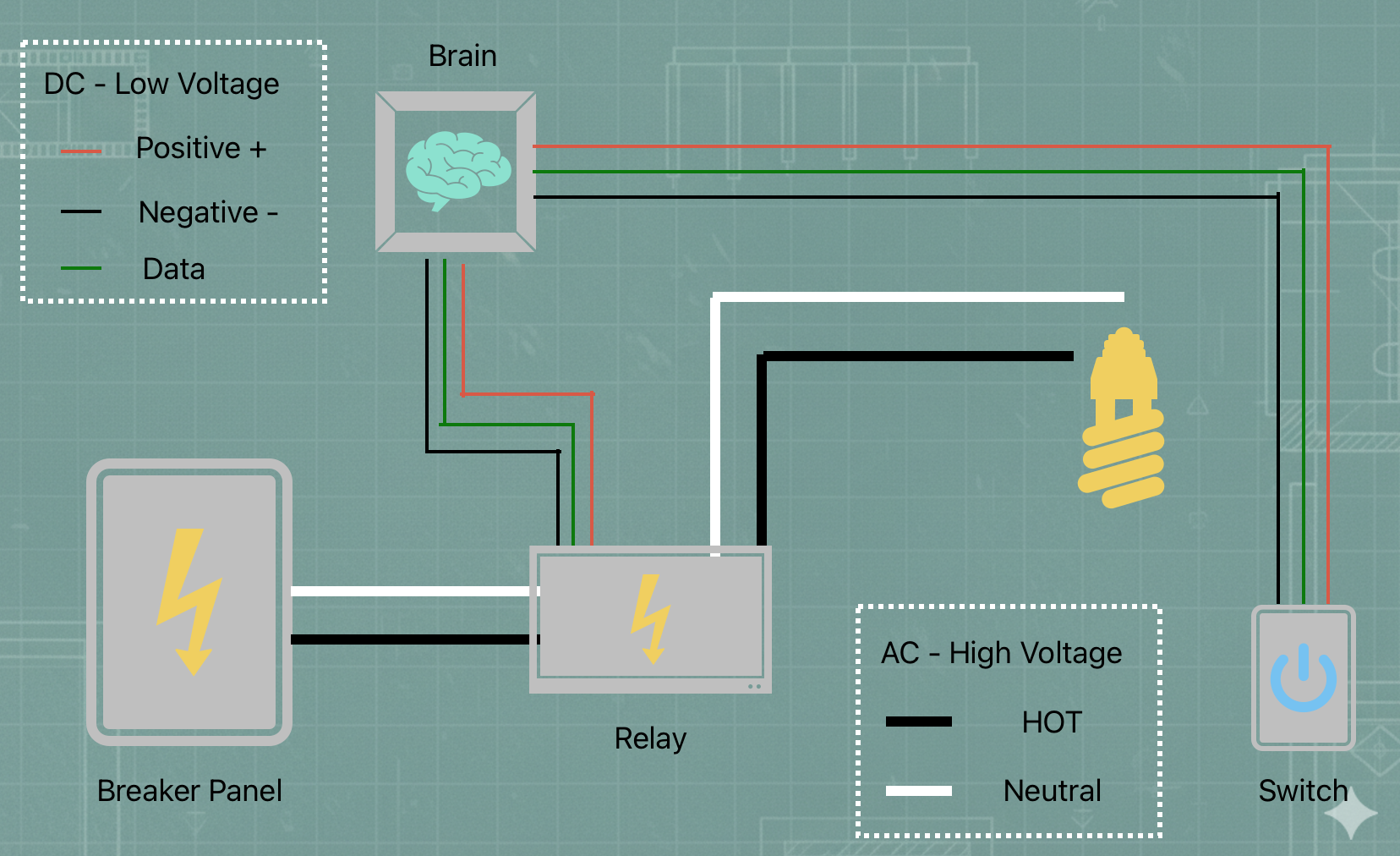
- Positive (+): Provides the power to the keypad (so the buttons can light up).
- Negative (-): Completes the power loop for the keypad.
- Data: This is the "messenger." When you press a button, a digital signal is sent down this wire to tell the brain exactly which button was pushed.
The Control Panel (The Brain)
Every single keypad wire in the house traveled back to a central "Control Box". Inside this box was the CCU (Central Control Unit). This was the brain. It would listen for a "click" from a switch and then decide which light should turn on.
The Relays (The Muscle)
The brain didn't actually touch the high-voltage electricity. Instead, it sent a signal to a Relay. A relay is an electromagnetic switch. When the brain tells it to, it magnetically "claps" two metal plates together to complete the 110v loop for the lightbulb.
In short:
Button → Control Panel → Relay → Light
LiteTouch Wiring diagram
As shown in the diagram below, the picture becomes a little more complicated due to the addition of new components. The switch was replaced for a relay instead, and the relay is controlled by the brain which is listining to the keypad/switches all around the house.
Comparison table
To understand why this house is "unconventional," it helps to see exactly how a LiteTouch system differs from the standard light switches you find in a typical home.
| Feature | Traditional Switch | LiteTouch Keypad |
|---|---|---|
| Electricity Type | 110v AC (High Voltage) | 24v DC (Low Voltage) |
| Wiring Style | "In-Line" (Breaks the power loop) | "Signal" (Sends a digital message) |
| What happens inside? | A mechanical click connects metal. | A computer chip sends a data packet. |
| Safety | Can give a nasty shock if handled live. | Safe to touch (like a phone charger). |
| Location | Must be near the lights it controls. | Can be anywhere (all wires go to the brain). |